The PlayStation 5 controller is a technological marvel, but its battery life is often criticized. With a capacity of 1560mAh (compared to the DS4's 1000mAh), why does it drain so fast? We hooked it up to a multimeter to find out.
1. The Power Hogs
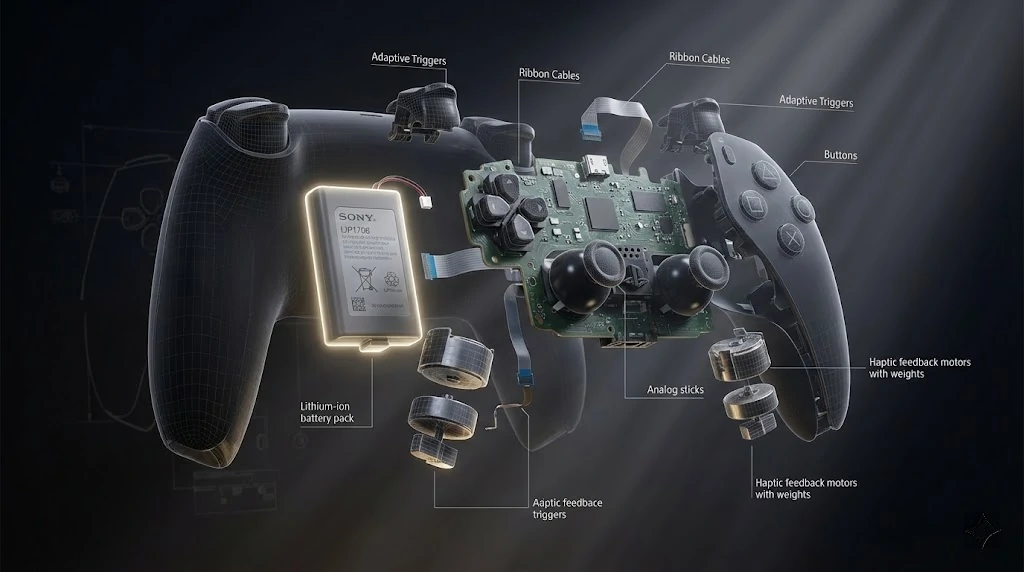
Unlike older controllers, the DualSense powers multiple heavy-duty motors and sensors simultaneously. Here is the breakdown of current draw (in milliamperes):
| Component | Current Draw (Approx) | Impact |
|---|---|---|
| Haptic Motors (Full Rumble) | ~250mA - 300mA | Very High |
| Adaptive Triggers (Active) | ~150mA - 200mA | High |
| Speaker & Mic (Active) | ~80mA - 120mA | Medium |
| Bluetooth Transmission | ~15mA - 20mA | Low |
2. The Microphone Myth
Did you know? Leaving the DualSense microphone ON (Light off) keeps the audio processing chip in high-power mode. It also reduces the vibration intensity automatically.
Pro Tip: Always mute the mic (Orange light ON) when not in use. This saves about 10-15% of battery life per session.
3. Understanding Charge Cycles
Lithium-ion batteries degrade over time based on "Cycles". One cycle is a full 100% to 0% drain. To extend the lifespan of your controller:
Avoid Deep Discharge
Don't let it hit 0%. Charge it when it reaches 20%.
Heat is the Enemy
Never charge while playing if the controller feels hot. Heat degrades internal chemistry.
4. Recommended Settings
For maximum playtime without sacrificing the "Next-Gen" feel, we recommend:
- Vibration Intensity: Weak/Medium
- Trigger Effect: Medium
- Microphone: Muted